How to Fix a Noisy KitchenAid Stand Mixer
To fix a noisy KitchenAid stand mixer, stop it and find where the sound comes from: the bowl, the attachment or the base. Most noise is a loose bowl, a beater set too close to the bowl, or a part that needs tightening or replacing.
On this page (9 sections)
- Why is my KitchenAid stand mixer noisy?
- How do you find the source of the noise?
- What causes a rattling or knocking sound?
- How do you stop the beater scraping the bowl?
- Why does my mixer make a grinding sound?
- What should you check on the base and the cord?
- Which mixer part fixes a noisy KitchenAid?
- When should you call service instead of fixing it yourself?
- What's the quick answer for a noisy KitchenAid?
To fix a noisy KitchenAid stand mixer, stop it and find where the sound comes from: the bowl, the attachment or the base. Most noise traces to a loose bowl, a beater set too close to the bowl, or a part that needs tightening or replacing.
Once you know the source, the fix is usually quick.
This guide walks through how to fix a noisy KitchenAid stand mixer without guessing, and it covers when a part swap is enough and when the mixer itself needs service.
Why is my KitchenAid stand mixer noisy?
A noisy KitchenAid stand mixer usually has one part that's loose, misaligned or worn, not a mysterious fault in the whole machine. The mixer is a simple chain: the motor turns gears, the gears turn the head or bowl shaft, and the attachment mixes.
Noise starts where that chain loses its fit. A steady mechanical hum is normal and rises with speed, because the 10-speed control on a tilt-head model like the Artisan runs from a very slow stir to a fast whip.
What isn't normal is a rattle, a scrape, a thump that repeats, or a grind. Those sounds have a location.
Your job is to find it before you touch a screwdriver. Listen with the bowl empty and the mixer on its lowest speed first, then add the attachment and a small batch of ingredients.
The change in sound between those steps tells you a lot.
How do you find the source of the noise?
Run three short checks in order: bowl only, bowl with attachment, and bowl with ingredients. Each step isolates one part of the mixer.
Start with an empty bowl locked on the base and run the mixer briefly at speed 2.
If the noise is already there, the problem sits in the base, the bowl seat or the head. Next, fit the attachment and run it again without ingredients.
A new rattle points to the beater, whip or dough hook. Finally, add a small batch of soft mixture.
A sound that only appears under load suggests the beater is dragging on the bowl or the head needs adjustment. Keep each run short and stop as soon as you hear something wrong.
Unplug the mixer before you reach under the head.
What causes a rattling or knocking sound?
A rattle or knock usually means the bowl isn't seated or the head is loose. A tilt-head mixer locks its bowl onto the base with a twist, and if the bowl sits slightly off, it rattles against the base as the beater turns.
Lift the bowl off and set it back so the tabs engage fully, then press down and twist until it stops.
On tilt-head models, the head also has to lock down flat; if the head lock is loose, the head can bob and knock. A steady knock that matches the beater's speed often comes from the beater touching the bowl bottom rather than from the base.
Empty the bowl and look for shiny marks where metal meets metal. If the bowl wobbles when you press its rim, the seat or the base plate needs attention.
How do you stop the beater scraping the bowl?
Raise the beater slightly so it clears the bowl bottom, then test with a coin or a small piece of paper. A beater set too low scrapes the bowl on every turn, and that scrape is one of the most common causes of a noisy KitchenAid stand mixer.
Unplug the mixer and tilt the head back.
On tilt-head models, the height adjustment is a screw under the head near the hinge. Turn it a small amount, lower the head, and check the gap between the beater and the bowl bottom.
A flat beater should just clear the base, close enough to mix but not to touch. Run the mixer briefly at a low speed with the empty bowl to confirm the scrape is gone.
If the bowl has bright scrape marks, stop and adjust again before you mix anything. For a step-by-step look at the bowl and attachments, see our guide to how to clean a KitchenAid mixer.
When the attachment is the culprit
A wire whip or a flex edge beater that's bent, cracked or the wrong size for the bowl will make noise. A whip with bent wires wobbles and can strike the bowl side.
A flex edge beater that no longer sits flat scrapes unevenly. Check each attachment for damage and confirm it matches your bowl size before you blame the mixer.
The KitchenAid K45WW wire whip is built for tilt-head models and puts air into mixtures that need volume. It's hand wash only, so dry it well after use to keep the wires straight.
A flex edge beater scrapes the bowl as it mixes, which reduces the need to stop and scrape down the sides. A worn or bent one can catch and chatter instead of sweeping smoothly.
The KFE5T fits 4.5 and 5 quart tilt-head bowls and is dishwasher safe.
Why does my mixer make a grinding sound?
A grinding sound means metal is rubbing where it shouldn't, and you should stop the mixer right away. Unlike a rattle, a grind doesn't fix itself with a bowl adjustment.
Worn gears in the head or base are the usual cause on an older mixer, and continuing to run it can damage more than the worn part.
Don't try to lubricate your way out of it; grease won't replace a worn gear. Turn the mixer off, unplug it and stop using it.
KitchenAid service or a local repair shop can open the housing and replace the worn parts. If the mixer is still under warranty, contact KitchenAid before anyone else opens it.
A grinding mixer is the one case in this guide where the answer is service, not a home fix.
What should you check on the base and the cord?
Check the base for cracks and the cord for damage before you run the mixer again. A mixer that rattles across the counter can be sitting on an uneven base or a loose foot.
Wipe the base and set the mixer on a flat, stable surface.
Press each corner to see whether it rocks. The power cord also matters: a cord that's pinched, cracked or loose in the outlet can cause a buzz that sounds like it's coming from the motor.
Keep the cord clear of the bowl and the counter edge. The Artisan has a 36 inch cord, so there's usually room to route it away from the mixing area.
If the base is cracked or a foot is missing, stop using the mixer and have it checked.
Which mixer part fixes a noisy KitchenAid?
Start with the cheapest, most likely part: the beater or whip, then the bowl, then the head adjustment. A noisy mixer is often fixed by a correct, undamaged attachment and a properly seated bowl.
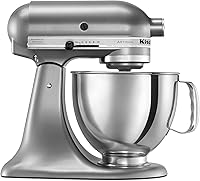
The KitchenAid Artisan 5-Qt Tilt-Head is the tilt-head model most readers have, with a 5 quart bowl, 10 speeds and a pouring shield.
Its controls run from a very slow stir to a fast whip, so you can test noise at low speed safely.
If your current beater or whip is bent or worn, replace that part first, since a new attachment is far cheaper than a service visit. Before you buy a replacement mixer, weigh the repair against a new one; our guide to are KitchenAid stand mixers worth it covers what the Artisan line gives you for the money.
A stand mixer earns its space for dough, batter and whipped cream, and our explainer on what is a stand mixer used for shows the jobs it handles. If the noise starts when you whip cream, check that the whip is seated and the bowl isn't overfilled; see our steps for how to make whipped cream in a stand mixer for the right speed and batch size.
When should you call service instead of fixing it yourself?
Call KitchenAid service or a repair shop when the noise is a grind, when the base is cracked, or when the mixer is under warranty. These are the cases where a home fix can void coverage or make the damage worse.
A grind points to worn gears inside the housing.
A cracked base is a safety issue. Warranty coverage matters too, because opening the housing yourself can end it.
For everything else, a bowl reseat, a beater height adjustment or a new attachment covers most noisy-mixer complaints. If the mixer is old and the repair quote is close to a new mixer's price, replacement is the practical call.
When in doubt, describe the sound to service and let them tell you what part to expect.
What's the quick answer for a noisy KitchenAid?
Fix the simple parts first: reseat the bowl, raise the beater off the bowl bottom, and replace a bent or worn attachment. That order solves most noisy KitchenAid stand mixer complaints without a repair bill.
If the sound is a grind or the base is cracked, stop and call service.
A steady hum is normal; a rattle, scrape, knock or grind is not. Keep the bowl seated, the beater just clear of the bottom, and the head locked down, and your mixer should run as quietly as it should.
If you're weighing a repair against a new machine, our look at are KitchenAid stand mixers worth it helps with that decision.
Frequently asked questions
Why is my KitchenAid stand mixer suddenly loud?
A sudden change in sound usually means something moved: the bowl came loose, the beater sits too close to the bowl, or the head lock loosened. Turn the mixer off and check those three things before you look at the motor.
Is some noise from a KitchenAid stand mixer normal?
Yes. A running mixer makes mechanical noise from the gears and motor, and the sound rises with speed.
Normal noise is steady and matches the speed setting; a rattle, scrape or thump that repeats is not normal.
How do I know if the beater is hitting the bowl?
Listen for a metallic scrape and look for bright marks on the bowl's bottom or the beater's edge. Stop the mixer, unplug it, and adjust the beater height with a coin or the screw under the head before you mix again.
Should I keep using a mixer that makes a grinding sound?
No. A grinding sound often means worn gears or a damaged part, and running it can make the damage worse.
Stop the mixer and have it looked at by KitchenAid service or a repair shop.
When is it time to replace the mixer instead of fixing it?
If the repair cost approaches the price of a new mixer, or the base is cracked and the gears are worn, replacement makes more sense. A working Artisan covers the same mixing jobs with its 10 speeds and 5-quart bowl.